Get started / CalendarWP
Templates and patterns
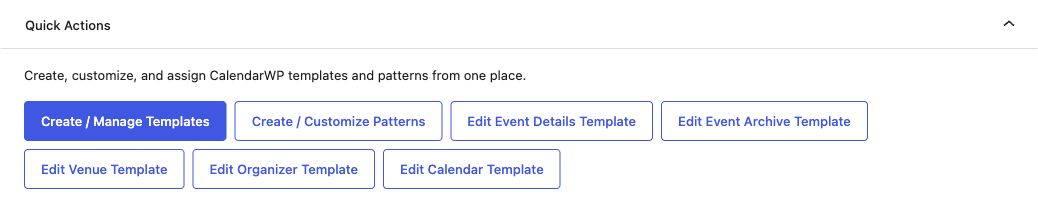 Options > Templates > Quick Actions. Open the template you want to customize, then save the override in the WordPress Site Editor. Click to enlarge.
CalendarWP includes layouts for event details, event archives, calendars, venues and organizers. A template controls the page layout; a pattern is a reusable arrangement of blocks within it.
Edit a bundled layout in the Site Editor
With a block theme, you can customize the bundled layouts without editing plugin files.
- Open CalendarWP > Options > Templates and use the template shortcuts, or open Appearance > Editor > Templates.
- Choose the layout you want to change, such as CalendarWP Event Details or CalendarWP Venue Page.
- Select the blocks you want to adjust. Change their arrangement, spacing or typography using the controls available for those blocks.
- Save the template, then open a real event or venue page to check the result. Check a phone-sized view too.
WordPress saves your customization as a site-level override. Plugin updates do not overwrite it. This also means a newly improved plugin default will not automatically replace your customized layout.
Use Templates > Quick Actions to open template and pattern management. An inserted pattern can be adjusted through its available block controls. Some dynamic event blocks have a fixed internal layout; the Site Editor does not expose every piece of their rendered HTML as an editable block.
Choose the right template
- Event Details changes individual event pages.
- Event Archive changes the main event archive.
- Calendar Page, Venue Page and Organizer Page change the corresponding term pages and their event lists.
- CalendarWP Wide Calendar provides a wider layout for pages containing a calendar block while retaining the theme's header and footer.
WordPress selects archive and term templates automatically. You do not need to assign a template separately to every calendar or venue.
For an individual event, use the event editor's Template selector. To choose the default for newly created events, open Options > Templates > Template Assignments > Default template for new events.
When CalendarWP first considers a page containing its calendar block, it selects the wide calendar template only if the page still uses WordPress's default template. This happens on save and during a one-time scan of existing pages. Existing custom choices and later manual changes are preserved, including switching back to the theme default.
Restore plugin defaults
The default Back to calendar link aligns with the event or taxonomy content surface. Its destination is unchanged. Mobile full-height drawers and compact modern-skin navigation are described in the core guide. Custom theme CSS or saved template overrides can affect the result.
Back up your template customizations first. CalendarWP > Options > Tools > Reset Template Overrides removes saved overrides so the plugin defaults apply again. Treat this as a reset, not a harmless preview: your saved layout changes will be removed.
If an update seems not to change a layout, check for a saved override before resetting anything.
Classic themes and archive navigation
Classic themes use bundled fallback templates; the block-theme Site Editor workflow may not be available. Do not edit files inside the plugin, because updates replace them.
Under Options > Templates > Event archive navigation, choose Pagination or Endless scroll (auto-load). Customized archive templates must retain CalendarWP's inherited event list and native pagination for auto-loading to work. See the core guide for keyboard behavior and loading fallbacks.
Applies to core 1.0.58-rc137. Theme features and individual block controls determine which editing options are available.